Creating real estate flyers used to be a creative, yet repetitive chore. Every agent knows the drill: a new listing pops up, and suddenly it's time to hunt for images, write copy, apply branding, align the layout, and export — all before lunch. Multiply that by five listings, throw in a couple of open houses, and suddenly you’re spending more time in Photoshop than showing properties.
But what if that process — the entire flyer creation cycle — could be automated? Not templated, automated. That’s where Stencil comes in.
This tutorial demonstrates how to use Stencil to transform the laborious, manual process of creating real estate flyers into a streamlined system that incorporates speed, consistency, and quality.
Why, Despite the Digital Age, Real Estate Flyers Are Still Important
Flyers have simply evolved; they are not dead. Flyers are now used in both digital and physical contexts, from email headers and social media images to print handouts at open houses .
-
Stats don’t lie: Homes with high-quality visuals sell 32% faster, according to NAR.
-
Brand matters: Agents with consistent branding across listings get 3x more referrals
-
Design fatigue is real: When each flyer is a one-off, things slip — fonts change, logos get resized wrong, colors drift. Consistency becomes chaos.
Flyers do more than just inform — they build credibility. And in real estate, credibility is currency.
Meet Stencil: Your Creative Automation Partner
Stencil is a visual design tool built for speed, but what makes it a true game-changer is its automation power. You can create a dynamic, reusable flyer system where new listings auto-generate ready-to-use designs — with property info, photos, agent details, and branding intact.
Think of it like this: once you’ve set your flyer system up, your job isn’t to make designs — it’s to approve them.
And no, you don’t need to write code to do this. As we like to say, "No code doesn’t mean no powers."
Building Your Real Estate Flyer System (The Smart Way)
Let’s walk through how to set up a flexible, brand-consistent flyer system inside Stencil. Here’s how we approach it:
1. Start with One Master Flyer Template
Think of this as your base layer. It should include:
- Logo and brand kit: Add your logo, set your brand colors and fonts.
- Placeholders for property images: Set aside two to three picture slots to highlight the listing.
- Important info slots:
- Address
- Price
- Beds/Baths/SqFt
- Agent name + contact
- CTA (e.g., “Schedule a Showing” or "Open House This Sunday")
Pro tip: Use clear hierarchy. The price and image should catch the eye first, then specs, then CTA.
2. Save It as a Reusable Template
In Stencil, once you’ve got your layout looking right, save it as a template. That’s the foundation you’ll automate from.
Automate with Stencil's API: Your Listings, On Autopilot
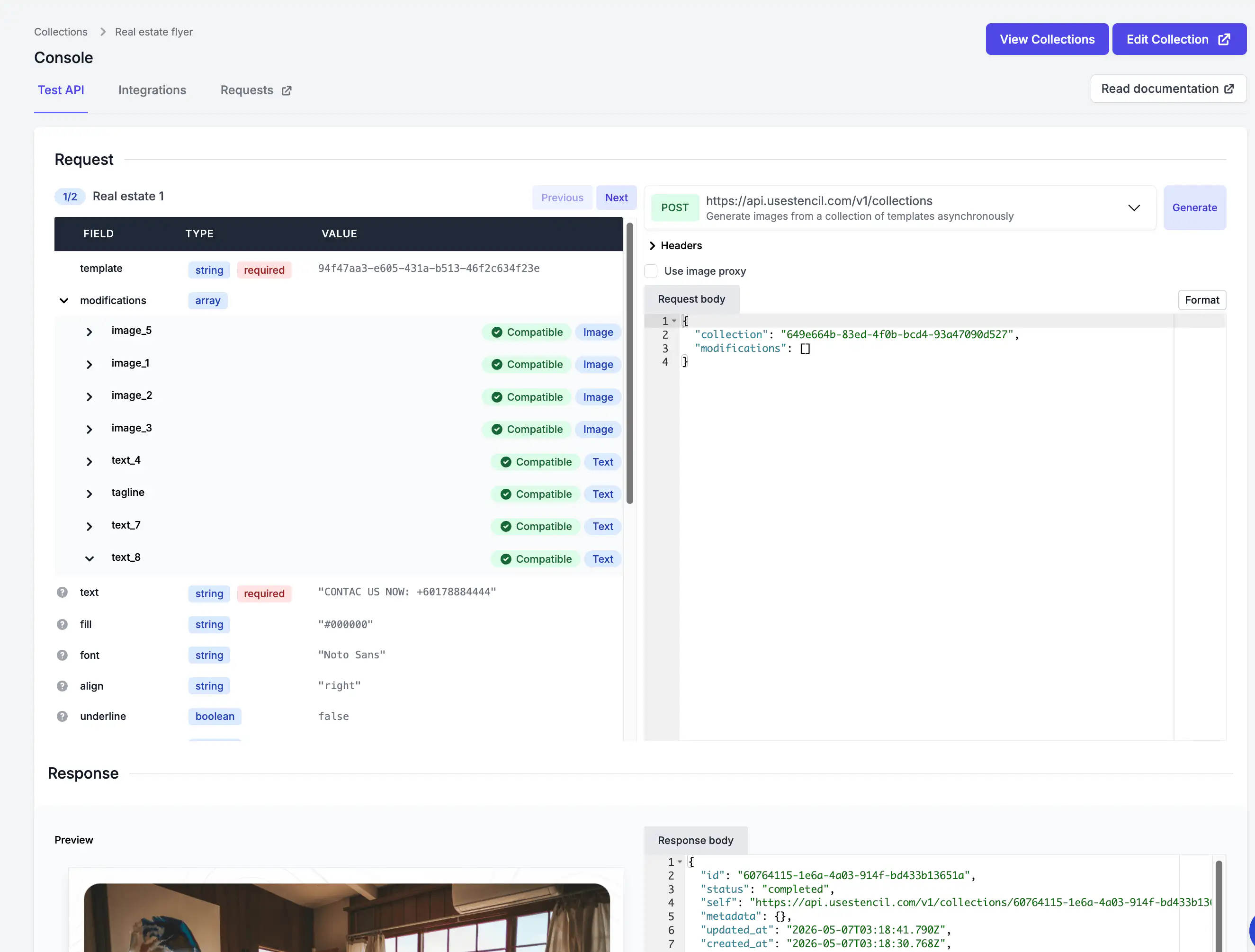
Now comes the magic. Your flyer template can be automatically updated with real-time data from your CRM, MLS, or even a Google Sheet by using Stencil's API.
Let’s say you’re tracking new listings in a spreadsheet:
| Address | Price | Beds | Baths | Image URL | Agent Name | Phone |
|---|
| 123 Maple Ave | $495,000 | 3 | 2 | image-link.jpg | Jane Li | 555-123-4567 |
When you set up your automation, Stencil reads that data and injects it into your saved flyer template. The image loads in, the price updates, the agent name personalizes — all in seconds.
You can generate 10 flyers in 10 seconds.
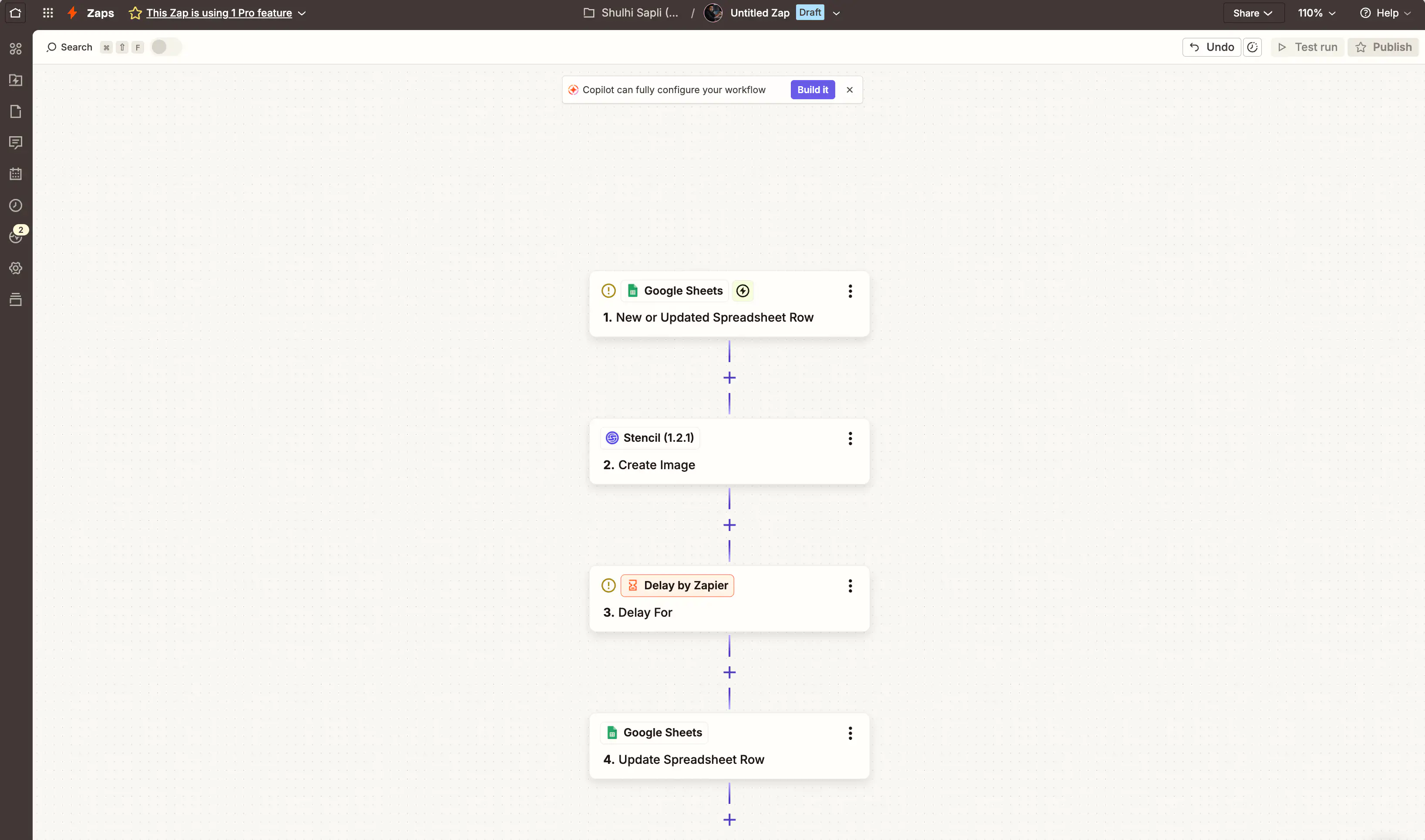
Here's a Simple Flow (No Code Needed):
- New property added in Google Sheets
- Zapier (or similar tool) sends that data to Stencil’s API
- Stencil builds the flyer and drops it in a Google Drive folder
- Agent gets a Slack ping: “Your flyer is ready!"
This alone can save teams dozens of hours per week.
Quality Control: Keep It Clean, Keep It Consistent
Automation without guardrails is chaos. Thankfully, Stencil lets you lock elements in your design template:
- Prevent agents from moving logos
- Lock brand fonts/colors
- Standardize CTA language
Before publishing, all generated flyers can be sent to a review queue. This implies that you get both the human eye for quality and the speed of automation.
Bonus: Are you interested in performance monitoring? A dynamic URL or QR code with UTM tags should be included in your call to action button. You can see which flyers bring in the most traffic.
Advanced Automation: Get Fancy Without Losing Focus
Once your system is up, you can scale it further:
Channel Variations
- Square version for Instagram
- Horizontal for Facebook
- Print-ready A4 with bleeds
Use Stencil to auto-generate all formats from one data input.
We make use of Stencil's template collection to group similar templates together. Using template, user can generate multiple formats with just a single request.
Seasonal Swaps
- Use variables to adjust backgrounds or colors by season (e.g., fall orange tones, summer blue skies)
A/B Testing
Create two flyer versions with distinct CTAs and layouts to observe which one generates more email clicks or social media interaction.
Connect to Marketing Resources
- Schedule the flyers automatically to either Meta Business Suite or Buffer.
- For direct email flyers, sign up with ActiveCampaign or Mailchimp.
This isn’t just design automation. It’s marketing workflow automation.
The Takeaway
You don’t need a design degree to look professional. And you don’t need a dev team to scale automation.
What you need is:
- One solid template
- Clean data (your listings)
- A clear workflow (even simple Zapier flows)
And with that, your team can go from "every flyer takes 45 minutes" to "every flyer takes 45 seconds."
So while your competitors are still fiddling with fonts, you’ll be out there doing what you do best: closing deals.
"In real estate, time is money. Stencil gives you both."
Try it yourself — generate a real estate flyer in seconds with our free tool: Real Estate Flyer Maker